Greetings PS 101 Families:
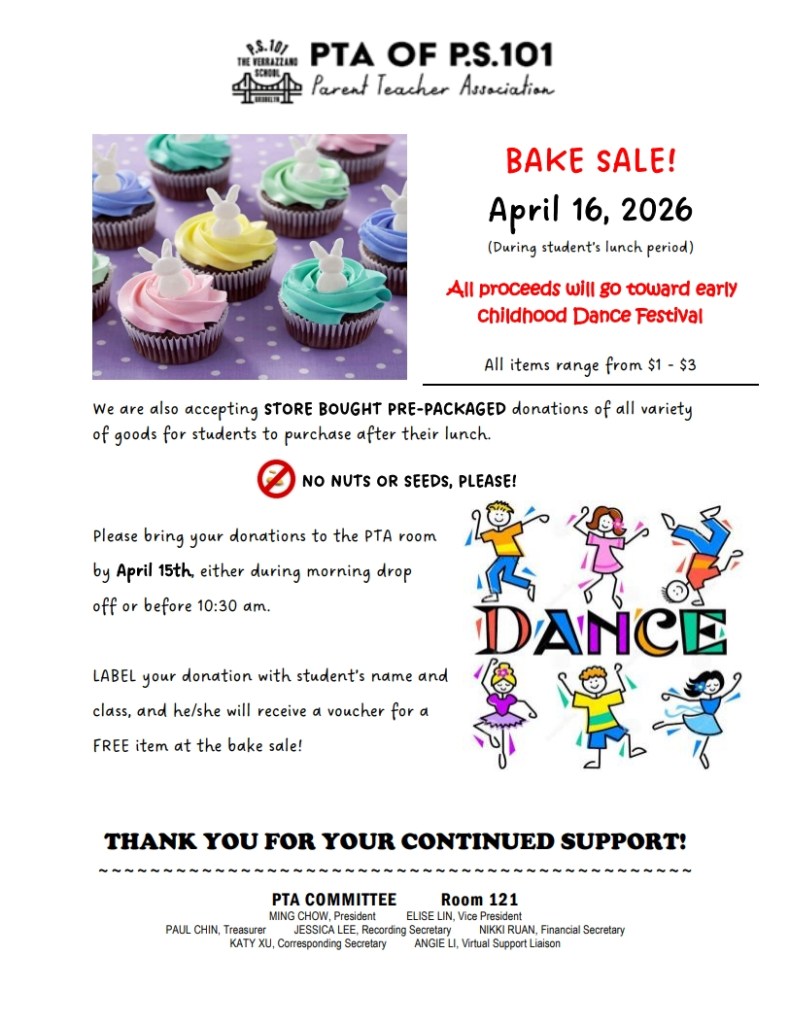
The next PTA Bake Sale is scheduled for Thursday, April 16th. Please show your support by bringing in donations of goods (NO NUTS OR SEEDS PLEASE). See below flyer for further information:
Greetings PS 101 Families:
The next PTA Bake Sale is scheduled for Thursday, April 16th. Please show your support by bringing in donations of goods (NO NUTS OR SEEDS PLEASE). See below flyer for further information:
Dear PS 101 Families,
It’s Parent Survey time!
School Survey = Your School + Your Voice!
Please take a few minutes to complete the NYC DOE Parent Survey to ensure your voice is heard and to help us celebrate PS 101. Your feedback is important to us, and we truly value our PS 101 families! Deadline to complete the survey is April 1, 2026.
You may complete the Parent Survey online by visiting: https://surveys.panoramaed.com/nycdoe/login or scanning the QR code below.
Login instructions:
If you prefer, you may complete the paper Parent Survey that was sent home. Please return it as soon as possible.
To ensure surveys can be scanned properly, please follow these instructions carefully:
Important Reminders & Incentives
Thank you for your time, support, and partnership. Together, we continue to make PS 101 a wonderful place for our students and families!
Sincerely,
Gregg Korrol
Principal
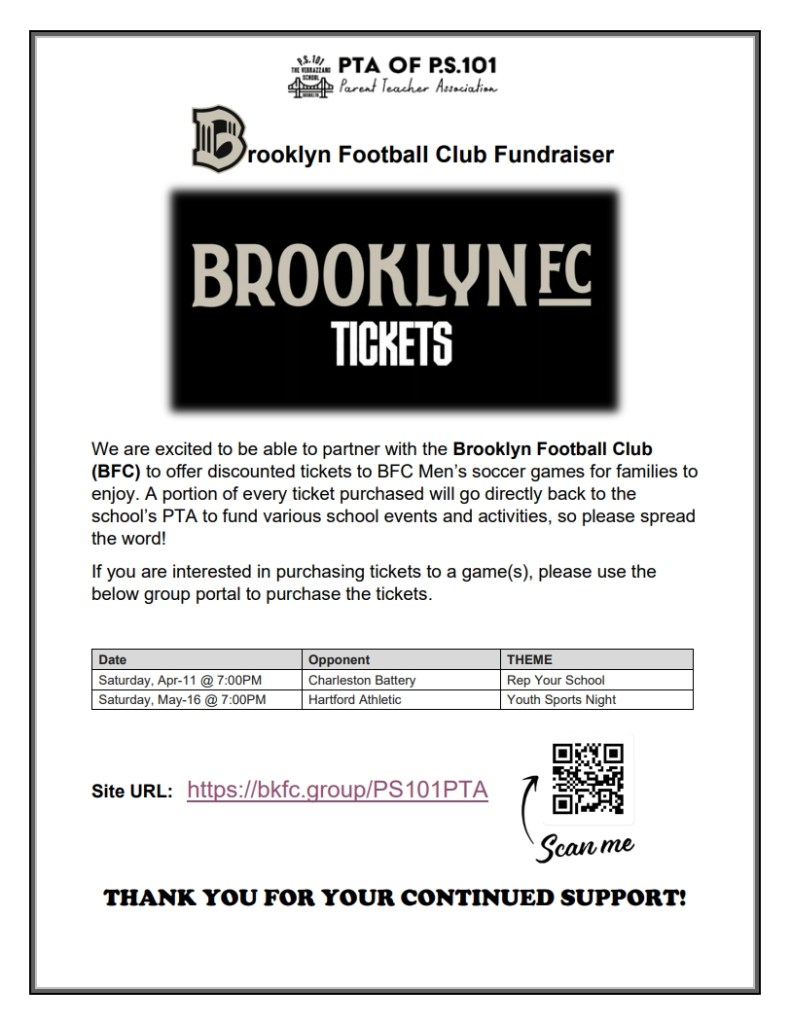
Purchase tickets by using the QR code in the flyer or using this link: https://bkfc.group/PS101PTA
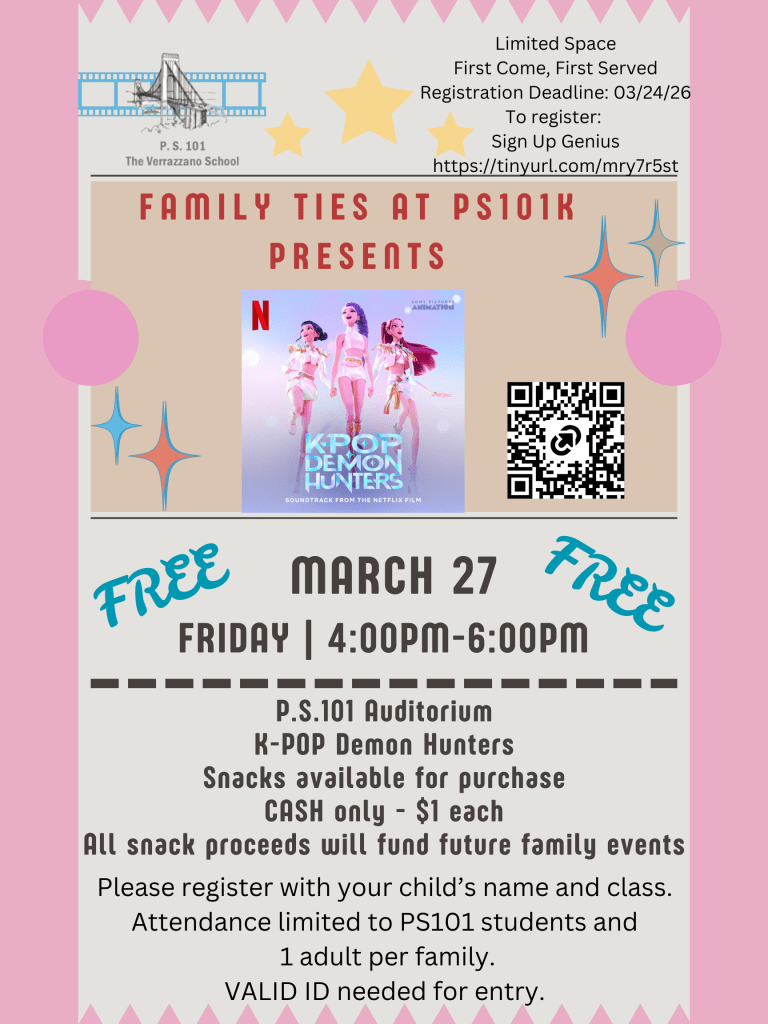
Register for this event by scanning the QR code in the flyer or using this link: https://tinyurl.com/mry7r5st
Dear PS 101 Families,
PS 101 is excited to partner with Puppetry in Practice, Inc. to present Puppetry for All! — a joyful, hands-on puppet making workshop designed for participants of all ages. Families will explore creativity together while learning the art of puppetry and bringing their own unique characters to life!
🗓 Date: Saturday, March 28, 2026
⏰ Time: 9:00 AM – 10:30 AM
📍 Location: PS 101 School Building
🎟 ⚠️ Registration & Participation
🔗 RSVP Here: Google Link: https://forms.gle/y2yvxGU4gMxYtUan7
We look forward to an afternoon filled with creativity, imagination, and family fun!
Sincerely,
Gregg Korrol
Principal
Dear PS 101 Families,
Thank you for your generosity and support of our Blood Cancer United (formerly known as the Leukemia & Lymphoma Society) Fundraiser. With your kindness and willingness to give, our school community came together to support an important cause while teaching our students the value of compassion, service, and helping those in need.
Through this fundraiser and the student presentations, our children learned about the importance of health research, the power of giving back, and how working together can make a meaningful difference, all while having fun and learning along the way.
We are proud to share that the PS 101 school community raised $6,934.63 in support of this cause!
Your continued partnership and support help make PS 101 a caring, connected, and service-minded community. Thank you for standing with us and for helping show our students that kindness and generosity truly matter.
Sincerely,
Gregg Korol
Principal
Greetings PS 101 Families:
Today is a half-day of school with students dismissing at 11:20 am and Parent-Teacher Conferences will be conducted virtually/via telephone during the following times
Please note:
If you have any questions or need assistance, please contact your child’s teacher or reach out to our Parent Coordinator, Ms. Bing Xing Lin, at 347-563-4680 or BLin9@schools.nyc.gov.
As always, thank you for your partnership and support in your child’s education.
Sincerely,
Gregg Korrol
Principal
Greetings PS 101 Families:
We’d like to remind you that Thursday, March 5th is our spring Parent-Teacher Conferences and will be a half-day of school with student dismissal at 11:20 am. Students will eat lunch in school before leaving for the day. Please make necessary arrangements for your child ‘s early dismissal at 11:20 am. Kindly note, all PS 101 afterschool programs are cancelled on this day.
You will have the opportunity to participate in a virtual or telephone Parent-Teacher Conference with your child’s teacher on Thursday, March 5th during the following times:
Please note:
If you have any questions or need assistance, please contact your child’s teacher or reach out to our Parent Coordinator, Ms. Bing Xing Lin, at 347-563-4680 or BLin9@schools.nyc.gov.
As always, thank you for your partnership and support in your child’s education.
Sincerely,
Gregg Korrol
Principal
Greetings PS 101 Families:
Please be advised the second marking period for the school term has come to an end and today, and you will have access to your child’s report card on Wednesday, March 4th in preparation for the spring parent-teacher conferences.
If you should have questions or concerns regarding your child’s grades, please feel free to reach out to your child’s teacher. Please see below for information on the academic policy and how to retrieve your child’s report card online:
| PS 101 Academic Policy: ME: “Mastery-Exceeds” Standards (95-100) = 4 by NYS Standards MA: “Mastery-Above” Standards (85-94) = a mid-high 3 by NYS Standards MT: “Mastery-Meets” Standards (75-84) = a low-mid 3 by NYS Standards MP: “Mastery-Approaching” Standards (65-74) = 2 by NYS Standards MB: “Mastery-Below Standards (64 or less) = 1 by NYS Standards |
| You may retrieve your child’s Report Card online (we do not give out paper report cards until the last day of school in June): Report Card grades will be posted on this NYC Schools Account (NYCSA) for student grades, school forms, IEPs, tests scores, reading level, enrollment history, transportation, health, attendance, fitness data, scheduling and more. |
| ACCESS TO NYC Schools Account: 1) Go to: www.schoolsaccount.nyc 2) Click on the blue icon/box “Sign In” 3) ENTER your username and password credentials that you signed up with for NYCSA access. 4) CLICK on MyStudent – GREEN BOX. 5) Select your student/child. 6) Select: GRADES 7) Current Report Card will be visible for you to click and access. Past Report Cards are also available for you to access. 8) You can also access a translated version of your child’s report card by clicking SETTINGS (top right corner gear icon) > Click Language Preference from the left side list > Select your language and click SAVE. |
If you have any questions or concerns, please contact our Parent Coordinator, Ms. Bing Xing Lin at 347-563-4680 or via email at BLin9@schools.nyc.gov.
Sincerely,
Gregg Korrol
Principal
 PS 101 The Verrazzano School